K_各工具实现Markdown语法高亮和实时预览
传送门:
O\_Markdown在线编辑器移植
K\_各工具实现Markdown语法高亮和实时预览
VSCode
VSCode默认支持Markdown文件预览,无需添加插件。
Notepad++
语法高亮
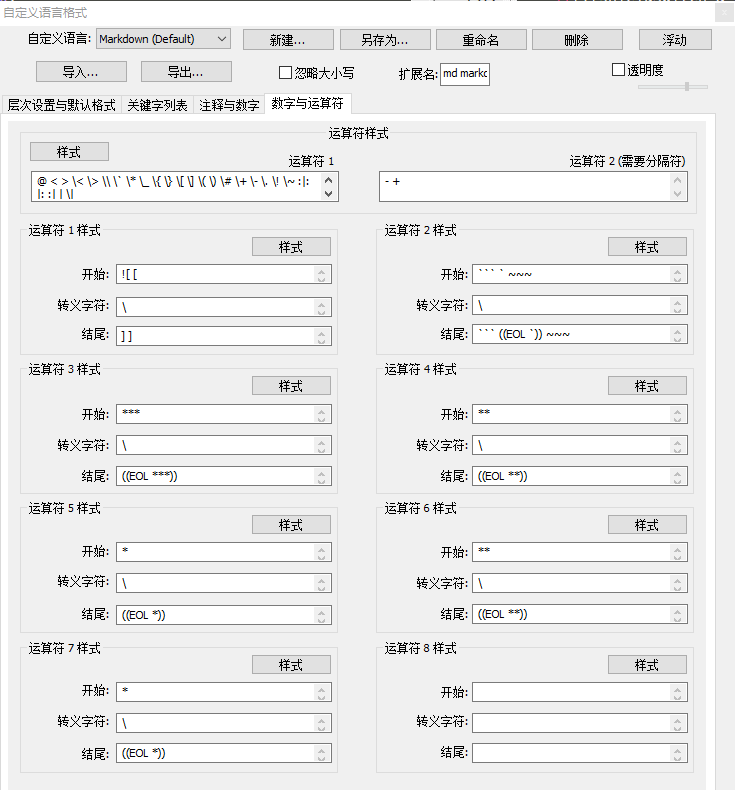
可以在https://github.com/Edditoria/markdown-plus-plus下载Markdown规则文件,在udl文件夹中找到适合自己主题的xml文件。
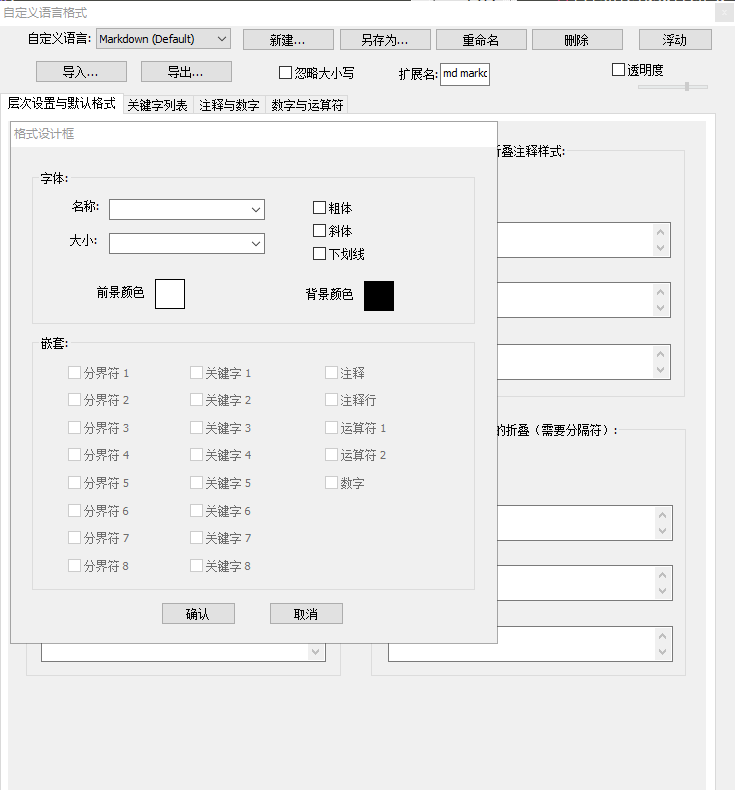
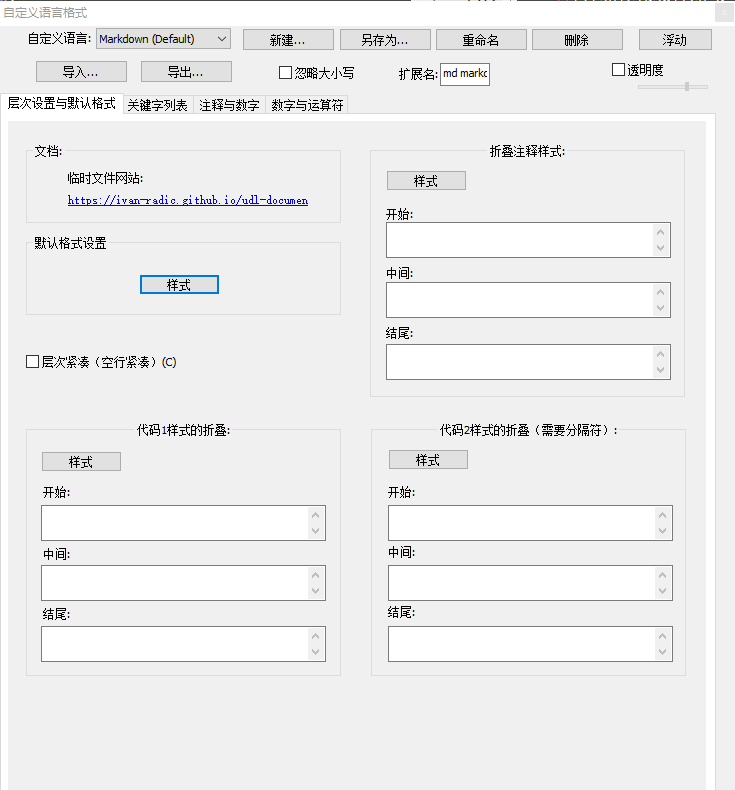
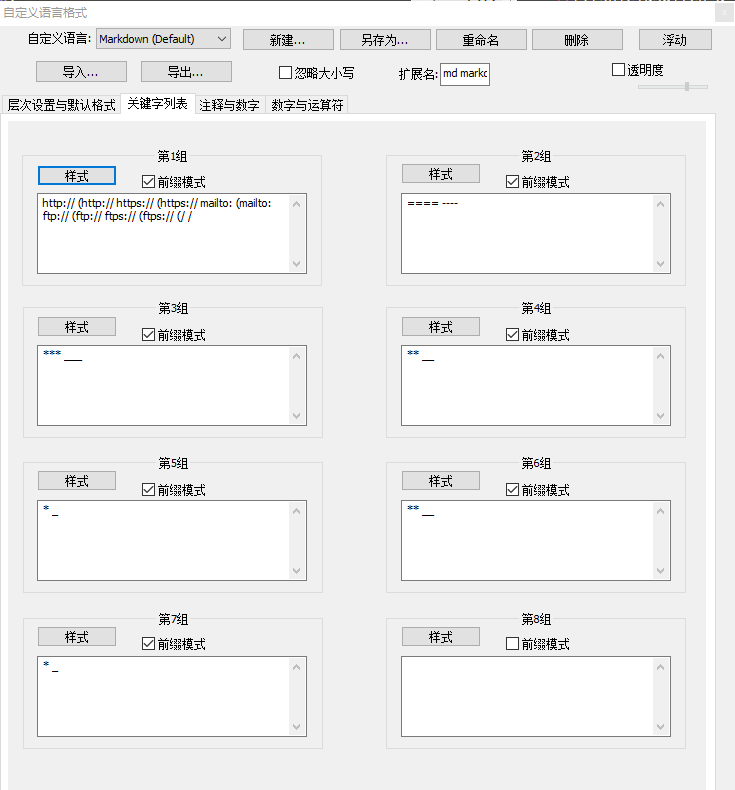
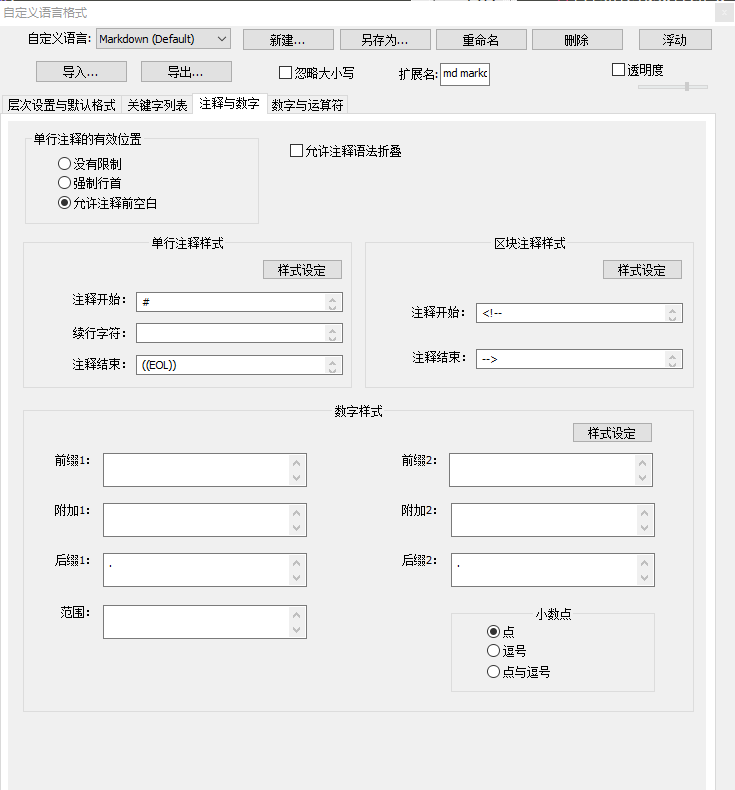
个人推荐最好在自己的主题基础上进行修改,比如本人用的Bespin主题,在语言->自定义语言格式...页面中如下配置关键字及与自己主题适配的前景背景色。
配置完成后可以导出为xml,以后更换电脑或分享时在语言->自定义语言格式对话框中选择导入xml文件即可。
md主题:_mdA.XML
实时预览
在插件->插件管理...页面找到NppMarkdownPanel插件安装,Notepad++自动重启后即可预览。
附:测试代码
#### Setting
{
codeFold : true
}
# Editor.md

     
**目录 (Table of Contents)**
[TOCM]
[TOC]
# Heading 1
## Heading 2
### Heading 3
#### Heading 4
##### Heading 5
###### Heading 6
# Heading 1 link [Heading link](https://github.com/pandao/editor.md "Heading link")
## Heading 2 link [Heading link](https://github.com/pandao/editor.md "Heading link")
### Heading 3 link [Heading link](https://github.com/pandao/editor.md "Heading link")
#### Heading 4 link [Heading link](https://github.com/pandao/editor.md "Heading link") Heading link [Heading link](https://github.com/pandao/editor.md "Heading link")
##### Heading 5 link [Heading link](https://github.com/pandao/editor.md "Heading link")
###### Heading 6 link [Heading link](https://github.com/pandao/editor.md "Heading link")
#### 标题(用底线的形式)Heading (underline)
This is an H1
=============
This is an H2
-------------
### 字符效果和横线等
----
~~删除线~~ <s>删除线(开启识别HTML标签时)</s>
*斜体字* _斜体字_
**粗体** __粗体__
***粗斜体*** ___粗斜体___
上标:X<sub>2</sub>,下标:O<sup>2</sup>
**缩写(同HTML的abbr标签)**
> 即更长的单词或短语的缩写形式,前提是开启识别HTML标签时,已默认开启
The <abbr title="Hyper Text Markup Language">HTML</abbr> specification is maintained by the <abbr title="World Wide Web Consortium">W3C</abbr>.
### 引用 Blockquotes
> 引用文本 Blockquotes
引用的行内混合 Blockquotes
> 引用:如果想要插入空白换行`即<br />标签`,在插入处先键入两个以上的空格然后回车即可,[普通链接](http://localhost/)。
### 锚点与链接 Links
[普通链接](http://localhost/)
[普通链接带标题](http://localhost/ "普通链接带标题")
直接链接:<https://github.com>
[锚点链接][anchor-id]
[anchor-id]: http://www.this-anchor-link.com/
[mailto:test.test@gmail.com](mailto:test.test@gmail.com)
GFM a-tail link @pandao 邮箱地址自动链接 test.test@gmail.com www@vip.qq.com
> @pandao
### 多语言代码高亮 Codes
#### 行内代码 Inline code
执行命令:`npm install marked`
#### 缩进风格
即缩进四个空格,也做为实现类似 `<pre>` 预格式化文本 ( Preformatted Text ) 的功能。
<?php
echo "Hello world!";
?>
预格式化文本:
| First Header | Second Header |
| ------------- | ------------- |
| Content Cell | Content Cell |
| Content Cell | Content Cell |
#### JS代码
` ``javascript
function test() {
console.log("Hello world!");
}
(function(){
var box = function() {
return box.fn.init();
};
box.prototype = box.fn = {
init : function(){
console.log('box.init()');
return this;
},
add : function(str) {
alert("add", str);
return this;
},
remove : function(str) {
alert("remove", str);
return this;
}
};
box.fn.init.prototype = box.fn;
window.box =box;
})();
var testBox = box();
testBox.add("jQuery").remove("jQuery");
` ``
#### HTML 代码 HTML codes
` ``html
<!DOCTYPE html>
<html>
<head>
<mate charest="utf-8" />
<meta name="keywords" content="Editor.md, Markdown, Editor" />
<title>Hello world!</title>
<style type="text/css">
body{font-size:14px;color:#444;font-family: "Microsoft Yahei", Tahoma, "Hiragino Sans GB", Arial;background:#fff;}
ul{list-style: none;}
img{border:none;vertical-align: middle;}
</style>
</head>
<body>
<h1 class="text-xxl">Hello world!</h1>
<p class="text-green">Plain text</p>
</body>
</html>
` ``
### 图片 Images
Image:

> Follow your heart.

> 图为:厦门白城沙滩
图片加链接 (Image + Link):
[](https://pandao.github.io/editor.md/images/7.jpg "李健首张专辑《似水流年》封面")
> 图为:李健首张专辑《似水流年》封面
----
### 列表 Lists
#### 无序列表(减号)Unordered Lists (-)
- 列表一
- 列表二
- 列表三
#### 无序列表(星号)Unordered Lists (*)
* 列表一
* 列表二
* 列表三
#### 无序列表(加号和嵌套)Unordered Lists (+)
+ 列表一
+ 列表二
+ 列表二-1
+ 列表二-2
+ 列表二-3
+ 列表三
* 列表一
* 列表二
* 列表三
#### 有序列表 Ordered Lists (-)
1. 第一行
2. 第二行
3. 第三行
#### GFM task list
- [x] GFM task list 1
- [x] GFM task list 2
- [ ] GFM task list 3
- [ ] GFM task list 3-1
- [ ] GFM task list 3-2
- [ ] GFM task list 3-3
- [ ] GFM task list 4
- [ ] GFM task list 4-1
- [ ] GFM task list 4-2
----
### 绘制表格 Tables
| 项目 | 价格 | 数量 |
| -------- | -----: | :----: |
| 计算机 | $1600 | 5 |
| 手机 | $12 | 12 |
| 管线 | $1 | 234 |
First Header | Second Header
------------- | -------------
Content Cell | Content Cell
Content Cell | Content Cell
| First Header | Second Header |
| ------------- | ------------- |
| Content Cell | Content Cell |
| Content Cell | Content Cell |
| Function name | Description |
| ------------- | ------------------------------ |
| `help()` | Display the help window. |
| `destroy()` | **Destroy your computer!** |
| Left-Aligned | Center Aligned | Right Aligned |
| :------------ |:---------------:| -----:|
| col 3 is | some wordy text | $1600 |
| col 2 is | centered | $12 |
| zebra stripes | are neat | $1 |
| Item | Value |
| --------- | -----:|
| Computer | $1600 |
| Phone | $12 |
| Pipe | $1 |
----
#### 特殊符号 HTML Entities Codes
© & ¨ ™ ¡ £
& < > ¥ € ® ± ¶ § ¦ ¯ « ·
X² Y³ ¾ ¼ × ÷ »
18ºC " '
[========]
### Emoji表情 :smiley:
> Blockquotes :star:
#### GFM task lists & Emoji & fontAwesome icon emoji & editormd logo emoji :editormd-logo-5x:
- [x] :smiley: @mentions, :smiley: #refs, [links](), **formatting**, and <del>tags</del> supported :editormd-logo:;
- [x] list syntax required (any unordered or ordered list supported) :editormd-logo-3x:;
- [x] [ ] :smiley: this is a complete item :smiley:;
- [ ] []this is an incomplete item [test link](#) :fa-star: @pandao;
- [ ] [ ]this is an incomplete item :fa-star: :fa-gear:;
- [ ] :smiley: this is an incomplete item [test link](#) :fa-star: :fa-gear:;
- [ ] :smiley: this is :fa-star: :fa-gear: an incomplete item [test link](#);
#### 反斜杠 Escape
\*literal asterisks\*
[========]
### 科学公式 TeX(KaTeX)
$$E=mc^2$$
行内的公式$$E=mc^2$$行内的公式,行内的$$E=mc^2$$公式。
$$x > y$$
$$\(\sqrt{3x-1}+(1+x)^2\)$$
$$\sin(\alpha)^{\theta}=\sum_{i=0}^{n}(x^i + \cos(f))$$
多行公式:
` ``math
\displaystyle
\left( \sum\_{k=1}^n a\_k b\_k \right)^2
\leq
\left( \sum\_{k=1}^n a\_k^2 \right)
\left( \sum\_{k=1}^n b\_k^2 \right)
` ``
` ``katex
\displaystyle
\frac{1}{
\Bigl(\sqrt{\phi \sqrt{5}}-\phi\Bigr) e^{
\frac25 \pi}} = 1+\frac{e^{-2\pi}} {1+\frac{e^{-4\pi}} {
1+\frac{e^{-6\pi}}
{1+\frac{e^{-8\pi}}
{1+\cdots} }
}
}
` ``
` ``latex
f(x) = \int_{-\infty}^\infty
\hat f(\xi)\,e^{2 \pi i \xi x}
\,d\xi
` ``
### 分页符 Page break
> Print Test: Ctrl + P
[========]
### 绘制流程图 Flowchart
` ``flow
st=>start: 用户登陆
op=>operation: 登陆操作
cond=>condition: 登陆成功 Yes or No?
e=>end: 进入后台
st->op->cond
cond(yes)->e
cond(no)->op
` ``
[========]
### 绘制序列图 Sequence Diagram
` ``seq
Andrew->China: Says Hello
Note right of China: China thinks\nabout it
China-->Andrew: How are you?
Andrew->>China: I am good thanks!
` ``
### End
评论已关闭