O_Markdown在线编辑器移植
传送门:
O\_Markdown在线编辑器移植
K\_各工具实现Markdown语法高亮和实时预览
提示
此文章面向在外非常用电脑使用,如果是自己常用的电脑,推荐使用Notepad++或VSCode搭建一个本地的Markdown编辑环境,使用起来更加顺手方便,具体教程详见 【K】Notepad++实现Markdown语法高亮和实时预览 及 【K】VSCode实现Markdown语法高亮和实时预览。
准备
在选择开源Markdown平台时用过showdown.js与marked.js,两者都能达到基本的转换功能,但总体上还是与想要的效果有点差距,showdown_ATY是之前用showdown.js做的一款极简的Markdown转换页面,可以实现高度自适应以及勉强算得上的同步滚动。
所以在多次不满意后找到了这款Editormd.js,官网:https://pandao.github.io/editor.md/,配置不算麻烦,而且集成多个插件,在使用体验上会好很多,唯一的缺点是太大了,经过精简后的移植包能达到4.65M的占用空间,不过倒是不影响加载页面的速度,只会多占用一些服务器空间罢了,具体实际移植后的界面:Markdown_ATY_Editor_md。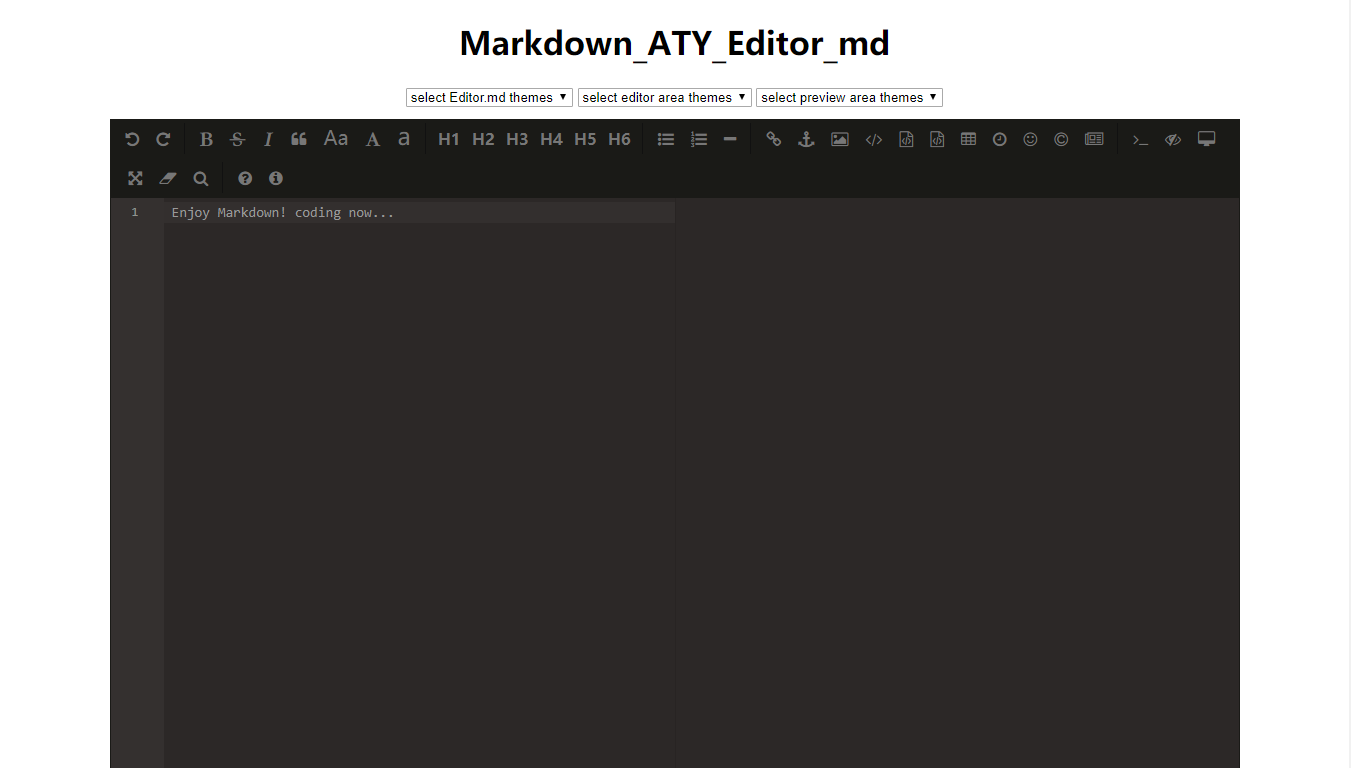
移植
在Editor.md官网下载包后的目录如下:
editor.md-master
|   .gitignore
|   .jshintrc
|   bower.json
|   BUGS.md
|   CHANGE.md
|   editormd.amd.js
|   editormd.amd.min.js
|   editormd.js
|   editormd.min.js
|   Gulpfile.js
|   LICENSE
|   package.json
|   README.md
+---css
+---docs
+---examples
+---fonts
+---images
+---languages
+---lib
+---plugins
+---scss
+---src
+---tests
个人精简后的移植包目录如下(不含子文件的目录即完全复制):
|   Markdown_ATY_Editor_md.html
|   Template.md
+---css
|       editormd.min.css
+---fonts
+---images
+---js
|       editormd.min.js
|       jquery.min.js
+---lib
+---plugins附:Win10导出目录树形结构:tree d:\deom /a /f > d:\tree.txt目录结构确定好后以examples中的simple.html作为基础进行整改,最终网页代码如下:
<!DOCTYPE html>
<html lang="zh">
    <head>
        <meta charset="utf-8" />
        <meta http-equiv="X-UA-Compatible" content="IE=edge" />
        <meta http-equiv="Cache-Control" content="no-siteapp"/>
        <meta name="renderer" content="webkit" />
        <meta name="viewport" content="width=device-width, initial-scale=1, maximum-scale=1, user-scalable=no" />
        <meta name="keywords" content="Editor.md,editor,Markdown Editor,Markdown,编辑器,Markdown编辑器,Markdown在线编辑器,在线编辑器,开源编辑器,开源Markdown编辑器" />
        <meta name="description" content="Editor.md: a simple online markdown editor. 开源在线 Markdown 编辑器" />
        <title>Markdown_ATY_Editor_md</title>
        <link rel="stylesheet" href="css/editormd.min.css" />
        <link rel="shortcut icon" href="https://mengze.top/MZtop/images/MZ_White.png" />
    <link rel="alternate" href="/atom.xml" title="Meng Ze" type="application/atom+xml">
</head>

    <body>
        <div id="layout">
            <header>
                <h1 style="text-align:center;">Markdown_ATY_Editor_md</h1>
                <div style="text-align:center; margin-bottom:12px;">
                    <select id="editormd-theme-select">
                        <option selected="selected" value="">select Editor.md themes</option>
                    </select>
                    <select id="editor-area-theme-select">
                        <option selected="selected" value="">select editor area themes</option>
                    </select>
                    <select id="preview-area-theme-select">
                        <option selected="selected" value="">select preview area themes</option>
                    </select>
                </div>
            </header>
            <div id="mainEditormd">
                <textarea style="display:none;"></textarea>
            </div>
        </div>

        <script src="js/jquery.min.js"></script>
        <script src="js/editormd.min.js"></script>
        <script type="text/javascript">
            var mainEditor;

            function themeSelect(id, themes, lsKey, callback)
            {
                var select = $("#" + id);

                for (var i = 0, len = themes.length; i < len; i ++)
                {
                    var theme    = themes[i];
                    var selected = (localStorage[lsKey] == theme) ? " selected=\"selected\"" : "";

                    select.append("<option value=\"" + theme + "\"" + selected + ">" + theme + "</option>");
                }

                select.bind("change", function(){
                    var theme = $(this).val();

                    if (theme === "")
                    {
                        alert("theme == \"\"");
                        return false;
                    }

                    console.log("lsKey =>", lsKey, theme);

                    localStorage[lsKey] = theme;
                    callback(select, theme);
                });

                return select;
            }

            $(function() {
                editormd.htmlEntitiesDialog={
                    path: "plugins/html-entities-dialog"
                    }
                mainEditor = editormd({
                    id: "mainEditormd",
                    width   : "90%",
                    height  : 720,
                    path    : "lib/",

                    // Editor.md theme, default or dark, change at v1.5.0
                    // You can also custom css class .editormd-preview-theme-xxxx
                    theme        : (localStorage.theme) ? localStorage.theme : "dark",
                    // Preview container theme, added v1.5.0
                    // You can also custom css class .editormd-preview-theme-xxxx
                    previewTheme : (localStorage.previewTheme) ? localStorage.previewTheme : "dark",
                    // Added @v1.5.0 & after version is CodeMirror (editor area) theme
                    editorTheme  : (localStorage.editorTheme) ? localStorage.editorTheme : "pastel-on-dark",

                    toc: true,
                    tocm: true,                 //目录
                    codeFold: true,            //代码折叠
                    syncScrolling: true,        //同步滚动 true | false | "single"
                    flowChart: true,            //流程图
                    sequenceDiagram: true,      //序列图
                    taskList: true,             //日程
                    htmlDecode: true,           //HTML标签解析
                    emoji: true,              //emoji源不稳定-不用
                    //tex: true,                 //公式-无用
                });

                themeSelect("editormd-theme-select", editormd.themes, "theme", function($this, theme) {
                    mainEditor.setTheme(theme);
                });

                themeSelect("editor-area-theme-select", editormd.editorThemes, "editorTheme", function($this, theme) {
                    mainEditor.setCodeMirrorTheme(theme);
                    // or mainEditor.setEditorTheme(theme);
                });

                themeSelect("preview-area-theme-select", editormd.previewThemes, "previewTheme", function($this, theme) {
                    mainEditor.setPreviewTheme(theme);
                });
            });
        </script>
    </body>
</html>
相对于simple.html加入的部分主要是主题修改的选项,以及各插件的开启,其它参数如下:
<script>
 $(function() {
var editor = editormd("test-editor", {
 height:'350px',
 syncScrolling : "single",
 emoji:true,
 //启动本地图片上传功能
 imageUpload: true,
 watch:true,
 imageFormats   : ["jpg", "jpeg", "gif", "png", "bmp", "webp","zip","rar"],
 path   : "./editormd/lib/",
 imageUploadURL : "./upload.php", //文件提交请求路径
 saveHTMLToTextarea : true, //注意3:这个配置,方便post提交表单
 previewTheme : "dark",//预览主题样式 黑色
 });
})
</script>
{
theme : "", // Editor.md self themes, before v1.5.0 is CodeMirror theme,
editorTheme : "default", // Editor area, this is CodeMirror theme at v1.5.0
previewTheme : "", // Preview area theme, default empty
width : "100%",
height : "100%",
path : "./lib/", // Dependents module file directory
pluginPath : "", // If this empty, default use settings.path + "../plugins/"
delay : 300, // Delay parse markdown to html, Uint : ms
autoLoadModules : true, // Automatic load dependent module files
watch : true,
placeholder : "Enjoy Markdown! coding now...",
gotoLine : true, // Enable / disable goto a line
codeFold : false,
autoHeight : false,
autoFocus : true, // Enable / disable auto focus editor left input area
autoCloseTags : true,
searchReplace : true, // Enable / disable (CodeMirror) search and replace function
syncScrolling : true, // options: true | false | "single", default true
saveHTMLToTextarea : false, // If enable, Editor will create a <textarea name="{editor-id}-html-code"> tag save HTML code for form post to server-side.
onload : function() {},
onresize : function() {},
onchange : function() {},
onwatch : null,
onunwatch : null,
onpreviewing : function() {},
onpreviewed : function() {},
onfullscreen : function() {},
onfullscreenExit : function() {},
onscroll : function() {},
onpreviewscroll : function() {},
imageUpload : false, // Enable/disable upload
imageFormats : ["jpg", "jpeg", "gif", "png", "bmp", "webp"],
imageUploadURL : "", // Upload url
crossDomainUpload : false, // Enable/disable Cross-domain upload
uploadCallbackURL : "", // Cross-domain upload callback url
emoji : false, // :emoji: , Support Github emoji, Twitter Emoji (Twemoji);
// Support FontAwesome icon emoji :fa-xxx: > Using fontAwesome icon web fonts;
// Support Editor.md logo icon emoji :editormd-logo: :editormd-logo-1x: > 1~8x;
tex : false, // TeX(LaTeX), based on KaTeX
flowChart : false, // flowChart.js only support IE9+
sequenceDiagram : false, // sequenceDiagram.js only support IE9+
previewCodeHighlight : true, // Enable / disable code highlight of editor preview area
toolbar : true, // show or hide toolbar
toolbarAutoFixed : true, // on window scroll auto fixed position
toolbarIcons : "full", // Toolbar icons mode, options: full, simple, mini, See `editormd.toolbarModes` property.
toolbarTitles : {},
toolbarHandlers : {
ucwords : function() {
return editormd.toolbarHandlers.ucwords;
},
lowercase : function() {
return editormd.toolbarHandlers.lowercase;
}
}以上两段代码摘自 markdown编辑器之editormd使用整合 - 扣丁曼 - 简书
问题
1、本地调试Emoji和HTML实体字符无法加载
在本地网页预览时点开Emoji与HTML实体字符两个框会一直转圈圈无法加载,关也关不上,Console会返回一句Markdown_ATY_Editor_md.html:1 Access to XMLHttpRequest at 'file:///D:/New200710/Markdown/Markdown_ATY_Editor_md/plugins/html-entities-dialog/html-entities.json' from origin 'null' has been blocked by CORS policy: Cross origin requests are only supported for protocol schemes: http, data, chrome, chrome-extension, https.,这是本地策略导致的,把网页放到服务器域名下自然就解决了。
2、GithubEmoji等Emoji加载不出来
这个问题是墙的原因导致的,如果非要用这个功能可以下载一个Emoji包放在目录里,然后在下方代码前面添加emoji的path路径,或者直接在editormd.min.js、editormd.js修改路径。
mainEditor = editormd({
    id: "mainEditormd",
    width   : "90%",
    height  : 720,
editor.emoji= {
path: "plugins/emoji-dialog/emoji/",
ext: ".png"
}此方法摘自 半暖商城番外篇--解决Editor.md中emoji图标无法显示的问题 - Alibct - 简书
由于本人用不太到Emoji,所以直接给关掉了....
3、图片上传相关
暂时用不到,具体可以参见 半暖商城番外篇--解决Editor.md中emoji图标无法显示的问题 - Alibct - 简书
评论已关闭